Cycling Tech
Being the techie that I am, of course a 14 day cycling trip is going to require some serious tech. So here’s what my cycling carry looks like.
Navigation
I used to use Garmin Edge devices on my various biking adventures, but they are tiny, routing info needs squinting and the smarts required to get back to the route after a detour, or starting somewhere else than what the route said have been seriously lacking. Combine that with severely limited storage and all that in expensive device… no thanks. I am carrying the perfect cycling computer with me all the time, my iPhone. So, on this trip, I am using my iPhone 15 Pro on a Quadlock Magsafe holder, connected to a massive battery, which rides in my top tube bag. That way, I am not going to be out of battery.
But now, what software to use? After some trying, I settled on RidewithGPS. I don’t like (or better, I am not used to) their planning features, so all the route planning I did with Strava. So the flow looks like this:
- plan the route with strava
- export GPX
- import GPX into RidewithGPS
Clunky, maybe. But it works for me. On a route, I am starting the workout on my apple watch as the main source of stats and on RidewithGPS for navigation purposes. Given that the watch is my main source of truth, it is important to switch off the apple health integration for workouts, as it leads to duplication.
After cycling, I use Healthfit to sync between the Apple Fitness and Strava. It is set up to be automatic - I found the Strava sync to be unreliable.
Safety
There is one Garmin device that I find absolutely essential though, and that is the Varia Radar. Built into the rear light, it warns you of cars behind you - and as I found out on this trip, it also flashes when cars approach - with a higher frequency when the relative speed is higher. When you run it on its own, it gives you audible clues, but the real power comes from using a head unit with it. Historically that would have been the Edge, but RidewithGPS integrates with it as well and shows all the cars behind you on a thin strip at the side of the map. Very useful.
Video
Of course I want to use video to document the various parts of my trip. For that I am using a mix of a DJI Mini 4 Pro drone and a DJI Action Cam with a handlebar mount. I will shoot all footage in D-Log M for color grading in Final Cut Pro X at night. To be able to do that, I am carrying my MacBook Pro M4, which adds considerable heft to the panniers but what can you do. So far, after editing 2 videos, I learned that you should absolutely switch on stablisation on the camera and that editing even simple stuff is significantly more work than anticipated. #neverstoplearning
Networking
For the longest time, I have been doing what everyone seems to be doing in hotels. Every device logs into the hotel wifi. Simple in some, painful in most with these ridiculous capture portals. Thanks to my friend Andreas, I am now the proud owner and user of a travel router. The one I chose, the gl-inet Slate 7 runs open source software, is easy(ish) to use, uses a really long password and connects straight-away to my VPN server at home. This has huge convenience aspects as all my devices know the network and connect to it immediately and nobody in the hotel will be able to sniff my traffic. Very convenient for constant travelers.
Blogging
Geekmode on. This blog is written in Markdown in Obsidian. The files are then pushed into a Github repo, which in turn is automatically loaded into a Cloudflare Page, because why not. I am using Hugo as the website builder, which conveniently is one of the available features in Cloudflare, and Cloudflare automatically pulls the repo when it detects a change.
The only thing I need to do is to mark
| |
in the front matter and push the repo to github with this handy little script
| |
If I want comments enabled, I set
| |
and my integration with utteranc.es enables you to comment if you have signed in with your github account. This should keep spam at a minimum.
Sidebar
When you are writing in MD, your links look like this
| |
your images like this
| |
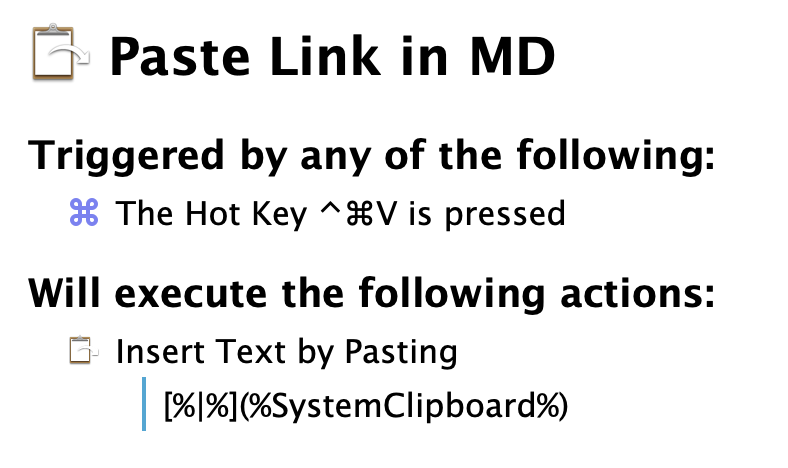
so this is getting a bit old. So I created an application-specific keyboardmaestro macro (if you have a mac and you are not using this tool, you are missing out!), which is mapped to ^+CMD+V, a combination that is not use elsewhere in the app. Here is the macro in case you are interested